

From ongoing work to critical property documents, managing your winter property routines using InCheck is the best way to succeed this season.
The Right Winter Workflows
Whether it’s for snow removal or snowstorm prep, creating winter Workflows helps your team know the exact processes for every scenario onsite.
Property-Specific Steps
Depending on your properties, preparing for winter may involve several steps – or none at all. Setting Workflows for specific properties and property groups makes sure your team doesn’t waste any time wondering what needs to happen.
While some properties may require full winterization, others may just need simple tasks like covering AC units, or securing outdoor spaces. In both cases, it’s easier for your staff when plans are laid out well in advance. They can see what they need to do when it’s assigned automatically each year, and mark when it’s complete.
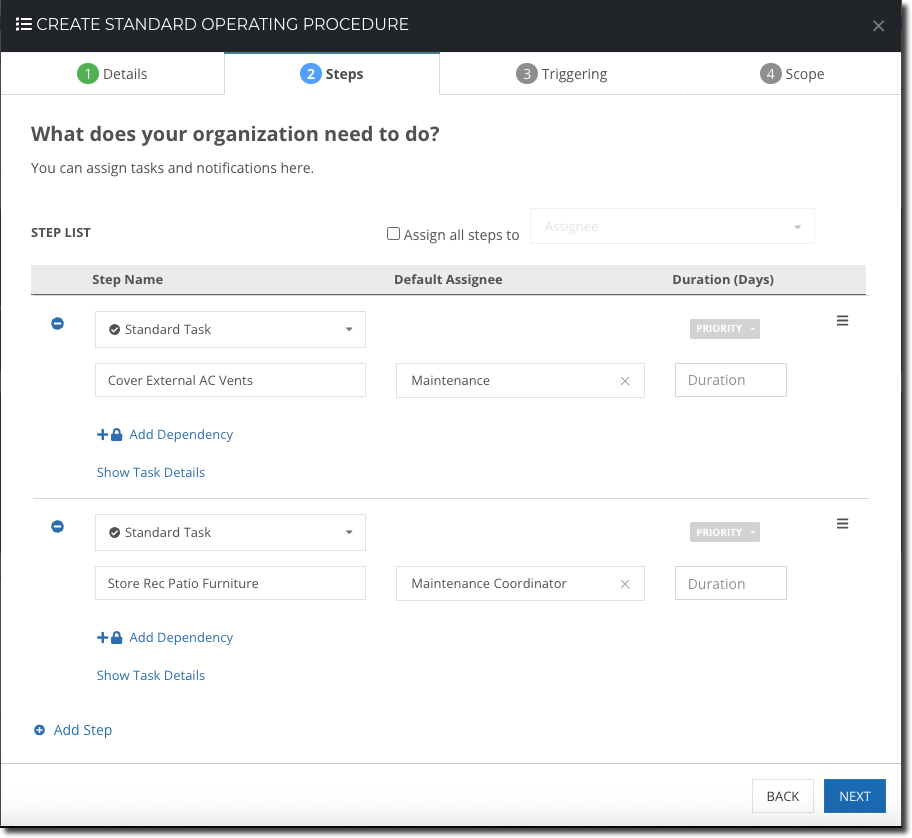
Tasks can vary depending on the property or property group – all documented the way you need.
Picture Proof
Logging completed tasks using the InCheck Mobile App gives you the ability to capture and store photos and videos. It’s especially important for risk management – like documenting cleared emergency corridors and pathways, or properly salted sidewalks. All photos are time and date-stamped too, so you can easily tell when work was completed.
Using Smart Stickers
Snow happens – sometimes you can’t plan for it; you can only respond to it. One way to log storm cleanup on the fly is through Smart Stickers. Smart Stickers let your team scan to trigger a specific Workflow immediately. Your team can use their InCheck Mobile App to scan & go, without having to wait for someone to assign them the work. Smart Stickers can be tied to any property, common area, unit, or asset. Some teams like to keep theirs by the front desk or maintenance room, depending on who’s handling the work.
Seasonal Agreements
If you have external teams or third parties performing winter work (snow and ice removal, general grounds maintenance) make sure to save those agreements in InCheck. Having your documents in one place helps make the following a breeze:
- Reviewing start and end dates – especially if you need to extend
- Confirming any per-service or seasonal rates easily
- Outlining scope of service and timing – what gets cleared and when (“within x hours of snowfall,” etc.)
- Emergency contact information
Document records can be customized by type in your account, so it’s easy to surface whatever items you want to pull out. It’s also easy to add additional documents like vendor insurance or warranties.
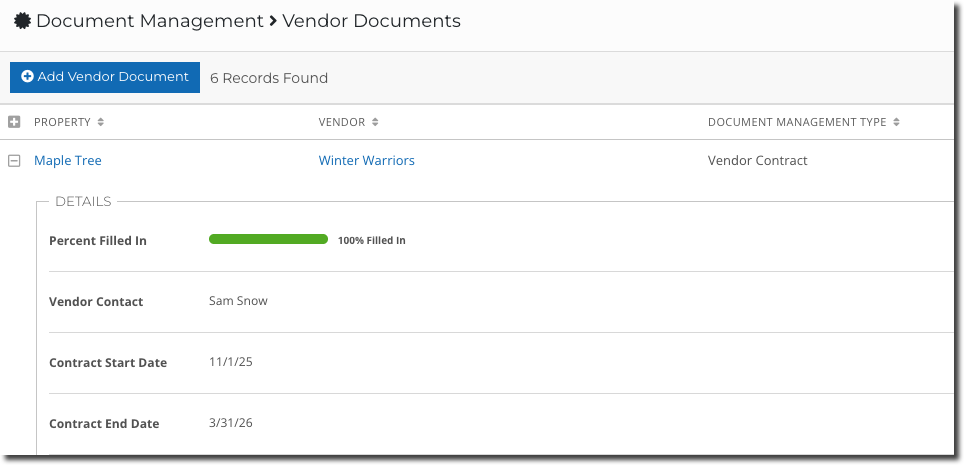
Any document in InCheck, including this Vendor Contract, can surface whatever details you want (in addition to the attached PDF).
Of course, any date fields can automatically triggering tasks to your team. Make your contract information work for you by setting up automatic renewal work tied to start date, end dates, or expiration dates.
Ongoing Preventive Maintenance
Winter is also an ideal time to check in on your preventive maintenance – especially for boilers and HVAC systems:
- Are ongoing inspection routines being completed?
- Do you need to adjust any routines for new properties or different equipment?
- Are there any troubling patterns your team is finding at specific properties, or overall?
- BONUS – review the warranty expirations for heating equipment in InCheck – are any set to expire soon? Do you have automated reminders in place for extending them?
We’re excited to announce even more functionality this year that’ll make adjusting your routines even easier for any season. Stay tuned for updates, and reach out to your Customer Success Manager or support@sitecompli.com if you need help with any of the above!
Related Articles

About the Author

